Simple String Hashing
This post was imported from an old blog archive, and predates the creation of AdamCaudill.com.
This is a very basic form of hashing algorithm, mainly created to use as an example, and it shouldn’t be considered secure, while it should be virtually impossible to reverse, if you are looking for a truly secure hashing algorithm for production use, look at using a SHA family hash, as they have been exhaustively tested and proven to work.
Read more…APISettings
This post was imported from an old blog archive, and predates the creation of AdamCaudill.com.
Visual Basic provides a less than elegant method of saving data in the Windows registry, the
GetSetting&SaveSettingfunctions. These functions store setting inHKEY_CURRENT_USER\Software\VB and VBA Program Settings\<AppName>\<Section>not very pretty is it?The
Read more…APISettingsmodule is a drop-in replacement using pure Win32 API for its processing power and increased stability. The reason for developing this and for making it drop-in compatible is to all those new to the Win32 API to add its functionality with minimal difficulty.Conexant (formerly Rockwell) Softmodem HSF Modem
This post was imported from an old blog archive, and predates the creation of AdamCaudill.com.
I was actually rather lucky to have this brand of WinModem, as the good people over at Linuxant.com offer a very high quality driver that makes installation a breeze! But, they have recently changed their marketing methods and charge $15 for the driver, so these really lives no viable, free alternative (a rarity to say the least for linux). So you have 2 options, you can use the free version they offer that is limited to 14.4kbps or pay the $15 for the full version of the driver. If you want a high quality, fully supported modem driver I’d highly recommend going to Linuxant.com and buying the driver from them, the support alone should be worth it, but if you want to try and save $15 and go it on your own, the information below may help.
Read more…IsOnline
This post was imported from an old blog archive, and predates the creation of AdamCaudill.com.
This is a simple function that checks to see if you’re online…
API:
Private Declare Function InternetGetConnectedStateEx Lib "wininet.dll" Alias "InternetGetConnectedStateExA" ( _
    lpdwFlags As Long, _
    lpszConnectionName As Long, _
    dwNameLen As Long, _
    ByVal dwReserved As Long) As Long
Function:
Public Function IsOnline() As Boolean
Dim lNameLen As Long
Dim lRetVal As Long
Dim lConnectionFlags As Long
Dim LPTR As Long
Dim lNameLenPtr As Long
Dim sConnectionName As String

    sConnectionName = Space$(256)
    lNameLen = 256
    LPTR = StrPtr(sConnectionName)
    lNameLenPtr = VarPtr(lNameLen)
    lRetVal = InternetGetConnectedStateEx(lConnectionFlags, ByVal LPTR, ByVal lNameLen, 0& )
    IsOnline = (lRetVal <> 0)
End Function
Returns true if you’re online, otherwise returns false. Simple eh?
PageSource
This post was imported from an old blog archive, and predates the creation of AdamCaudill.com.
Here is a quick little function to retrieve the source code of a web page, it’s pure API, so no Internet Transfer control required.
API:
Private Declare Function InternetOpen Lib "wininet.dll" Alias "InternetOpenA" ( _
    ByVal sAgent As String, _
    ByVal lAccessType As Long, _
    ByVal sProxyName As String, _
    ByVal sProxyBypass As String, _
    ByVal lFlags As Long) As Long
Private Declare Function InternetOpenUrl Lib "wininet.dll" Alias "InternetOpenUrlA" ( _
    ByVal hInternetSession As Long, _
    ByVal sURL As String, _
    ByVal sHeaders As String, _
    ByVal lHeadersLength As Long, _
    ByVal lFlags As Long, _
    ByVal lContext As Long) As Long
Private Declare Function InternetReadFile Lib "wininet.dll" ( _
    ByVal hFile As Long, _
    ByVal sBuffer As String, _
    ByVal lNumBytesToRead As Long, _
    lNumberOfBytesRead As Long) As Integer
Private Declare Function InternetCloseHandle Lib "wininet.dll" ( _
    ByVal hInet As Long) As Integer
Constants:
Private Const IF_NO_CACHE_WRITE = &H4000000
Private Const BUFFER_LEN = 256
Function:
Public Function PageSource(ByVal sURL As String, Optional ByVal strHeaders As String = "") As String
Dim sBuffer As String * BUFFER_LEN, iResult As Integer, sData As String
Dim hInternet As Long, hSession As Long, lReturn As Long
Dim lngHeaderLen As Long

    lngHeaderLen = Len(strHeaders)
    'get the handle of the current internet connection
    hSession = InternetOpen("User-Agent: Your-User-Agant-Here", 1, vbNullString, vbNullString, 0)
    'get the handle of the url
    If hSession Then hInternet = InternetOpenUrl(hSession, sURL, strHeaders, lngHeaderLen, IF_NO_CACHE_WRITE, 0)
    'if we have the handle, then start reading the web page
    If hInternet Then
        'get the first chunk & buffer it.
        iResult = InternetReadFile(hInternet, sBuffer, BUFFER_LEN, lReturn)
        sData = sBuffer
        'if there's more data then keep reading it into the buffer
        Do While lReturn <> 0
            iResult = InternetReadFile(hInternet, sBuffer, BUFFER_LEN, lReturn)
            sData = sData + Mid$(sBuffer, 1, lReturn)
            DoEvents
        Loop
    End If
    'close the URL
    iResult = InternetCloseHandle(hInternet)
    PageSource = sData
End Function
Simply pass the URL you want plus any extra headers that should be sent (one header per-line, each terminated by a
vbCrLf) and it returns the full source of the page (without headers).SetFocusByCaption
This post was imported from an old blog archive, and predates the creation of AdamCaudill.com.
This is a simple function really, it just sets the focus to a window based on its caption.
API:
Private Declare Function SetForegroundWindow Lib "user32" ( _
    ByVal hwnd As Long) As Long
Private Declare Function FindWindow Lib "user32" Alias "FindWindowA" ( _
    ByVal lpClassName As Any, _
    ByVal lpWindowName As Any) As Long
Function:
Public Function SetFocusByCaption(strCaption As String) As Boolean
Dim lngHandle As Long
Dim lngResult As Long

    lngHandle = FindWindow(vbNullString, strCaption)
    If lngHandle <> 0 Then
        lngResult = SetForegroundWindow(lngHandle)
        If lngResult = 0 Then
            SetFocusByCaption = False
        Else
            SetFocusByCaption = True
        End If
    Else
        SetFocusByCaption = False
    End If
End Function
Returns True/False based on success.
Register ActiveX & TypeLibs
This post was imported from an old blog archive, and predates the creation of AdamCaudill.com.
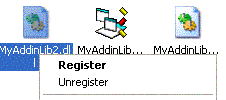
This is just a simple registry modification, just paste this into Notepad (or any plain text editor), save it as register.reg (or anything else so long as it has the .reg extension) then just double-click and you’re done!
REGEDIT4

[HKEY_CLASSES_ROOT\.dll]
@="dllfile"

[HKEY_CLASSES_ROOT\dllfile\Shell]

[HKEY_CLASSES_ROOT\dllfile\Shell\Register]

[HKEY_CLASSES_ROOT\dllfile\Shell\Register\Command]
@="\"REGSVR32.EXE\" \"%1\""

[HKEY_CLASSES_ROOT\dllfile\Shell\Unregister]

[HKEY_CLASSES_ROOT\dllfile\Shell\Unregister\Command]
@="\"REGSVR32.EXE\" /u \"%1\""

[HKEY_CLASSES_ROOT\.ocx]
@="ocxfile"

[HKEY_CLASSES_ROOT\ocxfile]

[HKEY_CLASSES_ROOT\ocxfile\shell]

[HKEY_CLASSES_ROOT\ocxfile\shell\Register]

[HKEY_CLASSES_ROOT\ocxfile\shell\Register\Command]
@="\"REGSVR32.EXE\" \"%1\""

[HKEY_CLASSES_ROOT\ocxfile\shell\Unregister]

[HKEY_CLASSES_ROOT\ocxfile\shell\Unregister\Command]
@="\"REGSVR32.EXE\" /u \"%1\""

[HKEY_CLASSES_ROOT\.tlb]
@="tlbfile"

[HKEY_CLASSES_ROOT\tlbfile]
@="Type Library"

[HKEY_CLASSES_ROOT\tlbfile\shell]

[HKEY_CLASSES_ROOT\tlbfile\shell\Register]

[HKEY_CLASSES_ROOT\tlbfile\shell\Register\Command]
@="\"REGTLIB.EXE\" \"%1\""

[HKEY_CLASSES_ROOT\tlbfile\shell\Unregister]

[HKEY_CLASSES_ROOT\tlbfile\shell\Unregister\Command]
@="\"REGTLIB.EXE\" /u \"%1\""
XP-Style Controls In Visual Basic 6
This post was imported from an old blog archive, and predates the creation of AdamCaudill.com.
This is a quick and dirty overview of how to get those ever so coveted XP controls in your application. There is a lot of detail I’m leaving out, but you should get the point, if you want more detail a google search or two should give you plenty of info.
Let’s get started….
First you need to make a manifest file, this is just a plain text file that tells Windows how to treat you program. Paste the following into Notepad and save it in the same folder that your program is in, with the name
Read more…<appname>.exe.manifest(where<appname>.exeis the name of your program, i.e. the manifest forMyGame.exewould beMyGame.exe.manifest).CloseApp
This post was imported from an old blog archive, and predates the creation of AdamCaudill.com.
This is a useful function to close a program based on a windows caption, this should work for any top-level window. Paste all this into a standard module, save it. Then call
CloseApp("Notepad")or whatever the name of the window is, it’s nice & simple and should close the program instantly.This requires Windows 2000 plus, for older versions of Windows a different method is required, that isn’t covered here, seeing as Windows 2000 and better require special privileges to forcefully close a program.
Read more…The SWEBS Project & The SWEBS Control Center
This post was imported from an old blog archive, and predates the creation of AdamCaudill.com.
I’m currently serving as the project manager & user interface designer for the project, here is the project’s goal & mission statement:
“The SWEBS Web Server is designed to be an easy to use web server that offers the functionality of enterprise web servers but with a very easy to use and configure interface. It is created as a learning tool to be used by anyone new to web development.”
Read more…
About Me

Security researcher, engineer and software developer with more than 20 years of experience.
Work: I primarily focus on application security, usable security, secure communications, and cryptography. I build and lead strong and dynamic teams, who cover all facets of security and privacy.
Writing: I write about my research, security in general, development and software design, and leadership through my blog, essays, and various publications. I also engage in some creating writing when I can.
Photography: I am a purist fine art photographer, working primarily in black & white, and focused on sharing new perspectives of the world. Limited edition prints of my work are available on my online gallery. I also have a background in photojournalism, and volunteer in this field when I can.